Image classification is now a key part of many applications. Whether you’re automating photo organization, filtering uploaded content, or enriching product catalogs with visual tags, knowing what’s in an image can be just as important as knowing what a user typed.
For Java developers, the challenge is familiar: most computer vision examples live in Python notebooks, while the systems that actually need image classification run on the JVM. Bridging that gap usually means standing up a separate Python microservice, managing REST calls, and dealing with serialization overhead. That’s a lot of ceremony for what should be a single processing step.
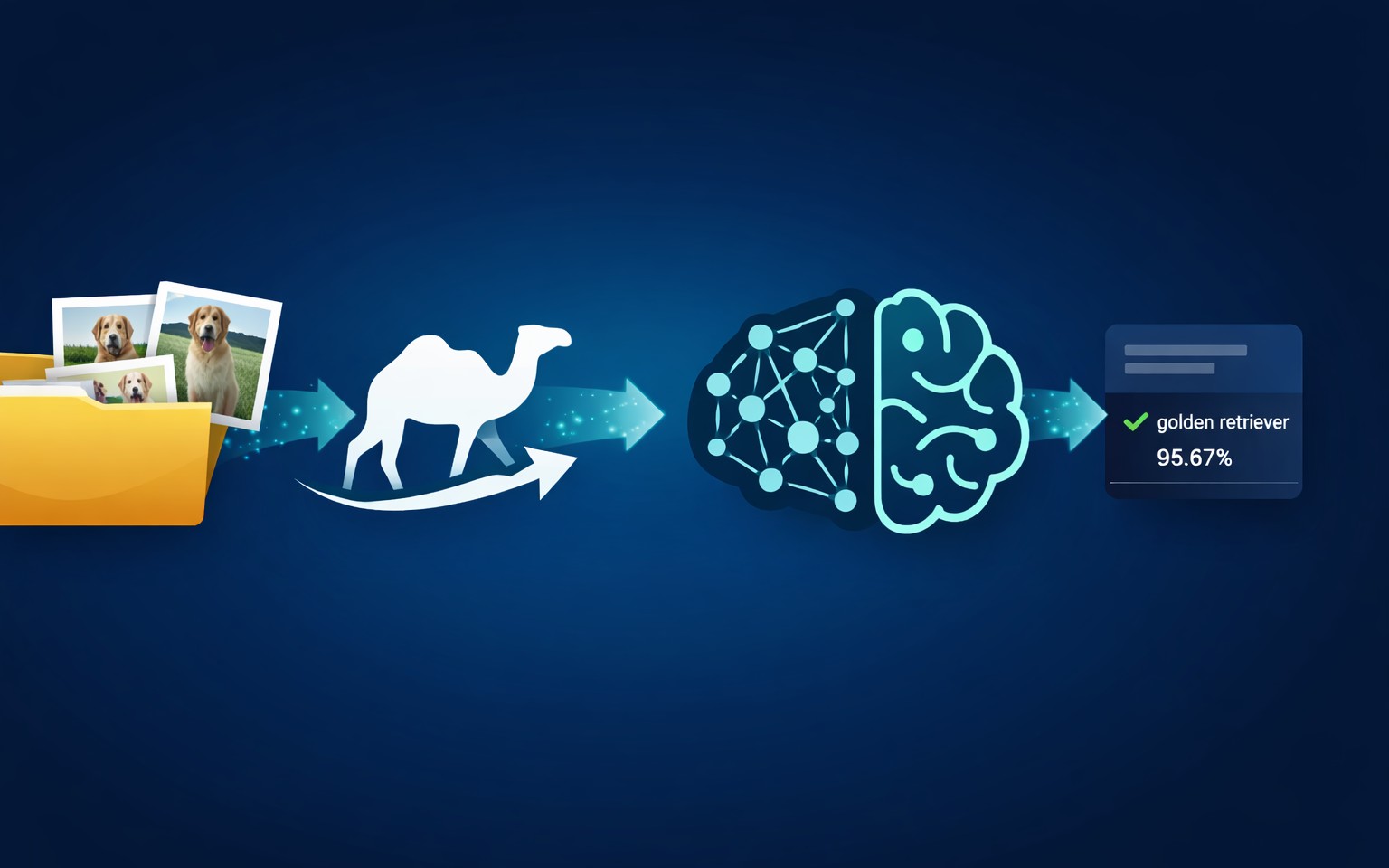
This tutorial will show you how to build an image classification pipeline in pure Java with Apache Camel and the Deep Java Library (DJL). We’ll cover watching folders for new images, running classification with a pre-trained ResNet model, tidying up the predictions into clean reports, and routing results to output files, all while leaning on those trusty Enterprise Integration Patterns you’re probably already familiar with.
What You’ll Learn
By the time you’re done here, you’ll be comfortable with:
- Develop a file-based image classification pipeline using Apache Camel.
- Use a pre-trained ResNet image classification model via Camel’s DJL component.
- Understand the djl: URI syntax and model configuration for computer vision tasks in Apache Camel.
- Structure routes with content-based routing and multiple formatter beans.
- Run image classification locally using Java and Apache Camel, without external APIs or Python services.
Frameworks Used
Apache Camel
Apache Camel is an awesome open-source integration framework built on Enterprise Integration Patterns. It has great components for connecting systems, moving data, and orchestrating workflows using declarative routes.
In this project, we look at file ingestion, message transformation, content-based routing, bean integration, error handling, and output persistence.
Deep Java Library (DJL)
DJL is a deep learning framework for Java that is engine-agnostic. It provides a high-level API for inference, training, and serving deep learning models right on the JVM.
We use the Camel-DJL component to load a pre-trained ResNet model from the DJL Model Zoo, run image classification inference inside the JVM, and return structured classification results.
ResNet for Image Classification
Residual Network (ResNet) is a deep convolutional neural network architecture that introduced skip connections to solve the vanishing gradient problem. The model we use here is pre-trained on the ImageNet dataset, which covers 1,000+ categories — animals, vehicles, everyday objects, food items, you name it. It strikes a nice balance between accuracy and inference speed for CPU-based classification.
Project Structure
Let’s look at the project structure below:
camel-image-classifier/
├── src/main/java/com/example/imageclassifier/
│   ├── MainApp.java                          # Application entry point
│   ├── routes/
│   │   └── ImageClassificationRoutes.java    # Camel route for image processing
│   └── processor/
│       ├── ClassificationsFormatter.java     # Formats DJL Classifications output
│       ├── MapResultsFormatter.java          # Formats Map-based results
│       └── FallbackFormatter.java            # Handles unexpected outputs
├── src/main/resources/
│   └── application.properties                # Camel configuration
├── data/
│   ├── input/                                # Drop JPEG images here
│   ├── output/                               # Classification results (text files)
│   └── classified/                           # Processed images archive
├── gradle/wrapper/                           # Gradle wrapper files
├── build.gradle                              # Project dependencies
├── settings.gradle                           # Gradle settings
├── gradlew.bat                               # Gradle wrapper script
├── README.md                                 # Main documentation
Gradle Dependencies
build.gradle
plugins {
    id 'java'
    id 'application'
}

group = 'com.example'
version = '1.0.0'
description = 'Image Classification with Apache Camel and DJL'

java {
    toolchain {
        languageVersion = JavaLanguageVersion.of(21)
    }
}

application {
    mainClass = 'com.example.imageclassifier.MainApp'
}

repositories {
    mavenCentral()
}

dependencies {
    // Apache Camel
    implementation 'org.apache.camel:camel-core:4.4.0'
    implementation 'org.apache.camel:camel-main:4.4.0'
    implementation 'org.apache.camel:camel-file:4.4.0'
    implementation 'org.apache.camel:camel-djl:4.4.0'

    // DJL (Deep Java Library) for image classification
    implementation platform('ai.djl:bom:0.28.0')
    implementation 'ai.djl:api'

    // MXNet engine for image classification (used by Camel DJL component)
    implementation 'ai.djl.mxnet:mxnet-engine'
    implementation 'ai.djl.mxnet:mxnet-model-zoo'
    // Use CPU-only MXNet runtime for Windows
    runtimeOnly 'ai.djl.mxnet:mxnet-native-mkl:1.9.1:win-x86_64'

    // Logging
    implementation 'org.slf4j:slf4j-simple:2.0.9'
}
A few things to note here compared to a typical NLP setup. For image classification, we use the MXNet engine instead of PyTorch. MXNet’s model zoo ships with a well-tested ResNet model optimized for image classification, and the mxnet-native-mkl dependency gives you CPU-optimized native libraries via Intel MKL. The DJL BOM makes sure the versions are consistent across engines and models.
Application Entry Point
The application starts up using the MainApp class and starts Camel using Main:
package com.example.imageclassifier;

import com.example.imageclassifier.routes.ImageClassificationRoutes;
import org.apache.camel.main.Main;

public class MainApp {

    public static void main(String[] args) throws Exception {
        System.out.println("=================================================");
        System.out.println("Image Classification with Apache Camel and DJL");
        System.out.println("=================================================");

        // Create and configure Camel Main
        Main main = new Main();

        // Add routes
        main.configure().addRoutesBuilder(new ImageClassificationRoutes());

        // Start Camel
        System.out.println("nStarting Apache Camel...");
        System.out.println("Watching folder: data/input");
        System.out.println("Output folder: data/output");
        System.out.println("Press Ctrl+C to stopn");

        main.run();
    }
}
Image Classification Route
The ImageClassificationRoutes.java is where the core logic is implemented using the Camel DJL component’s URI. It uses the “from” component for image ingestion (watches for JPEG files, processes them one at a time to extract the raw bytes, archives them with a timestamp), and uses a single “to” URI endpoint to run image classification using the DJL component URI. The route then dispatches to the right formatter using Camel’s content-based routing.
ImageClassificationRoutes.java
Let’s break this down:
Stage 1: File Ingestion
from("file:data/input?include=.*.(jpg|jpeg|JPG|JPEG)&noop=false&move=../classified/${date:now:yyyyMMdd-HHmmss}-${file:name}")The from component watches the data/input/ folder for JPEG files. The regex pattern include=.*.(jpg|jpeg|JPG|JPEG) makes sure only image files get picked up. Once processed, each image is moved to data/classified/ with a timestamp prefix, which prevents reprocessing and provides a clean audit trail. Setting noop=false means the file is consumed (moved), not left in place.
Stage 2: Image to Bytes
The DJL component expects the image as a byte[] so it can construct a DJL Image object internally. This inline processor reads the file into a byte array and replaces the message body with it. It’s a small but essential step; without it, the DJL component would receive a File reference instead of raw pixel data.
Stage 3: DJL Inference
.to("djl:cv/image_classification?artifactId=ai.djl.mxnet:resnet:0.0.1")This single line is the heart of the pipeline. Let’s unpack the URI:
- djl – The Camel DJL component
- cv/image_classification – The computer vision task type (as opposed to nlp/sentiment_analysis used in NLP tasks)
- artifactId=ai.djl.mxnet:resnet:0.0.1 – Identifies the pre-trained ResNet model from DJL’s MXNet Model Zoo
This single line replaces what would otherwise be hundreds of lines of model loading, image preprocessing, tensor conversion, and inference code.
Stage 4: Content-Based Routing
.choice()
.when(body().isInstanceOf(ai.djl.modality.Classifications.class))
.bean(new ClassificationsFormatter(), "format")
.when(body().isInstanceOf(java.util.Map.class))
.bean(new MapResultsFormatter(), "format")
.otherwise()
.bean(new FallbackFormatter(), "format")
.end()
Here’s something you’ll run into with image classification that you won’t see in the sentiment analysis setup: the DJL component can return different types depending on the engine and model version. Most of the time, you get a Classifications object, but some MXNet model variants hand back a Map<String, Float> instead. Rather than assuming one type and risking a ClassCastException in production, we use Camel’s Content-Based Router pattern to dispatch to the right formatter bean. The FallbackFormatter catches anything unexpected — so the pipeline never crashes silently.
This is a classic Enterprise Integration Pattern, and it’s one of the biggest advantages of using Camel for ML pipelines. The routing logic is declarative, testable, and easy to extend.
Formatter Beans
ClassificationsFormatter.java
This is the primary formatter, handling the standard Classifications output from DJL:
package com.example.imageclassifier.processor;

import ai.djl.modality.Classifications;
import org.apache.camel.Exchange;

import java.util.List;

/**
 * Bean to format DJL Classifications object into a text report.
 */
public class ClassificationsFormatter {

    public String format(Classifications classifications, Exchange exchange) {
        StringBuilder sb = new StringBuilder();
        String fileName = exchange.getIn().getHeader("CamelFileName", String.class);

        sb.append("Image: ").append(fileName).append('n');

        List<Classifications.Classification> topK = classifications.topK(5);

        if (!topK.isEmpty()) {
            Classifications.Classification top = topK.get(0);
            sb.append("Top Prediction: ").append(top.getClassName())
              .append(" (Confidence: ").append(String.format("%.2f%%", top.getProbability() * 100))
              .append(")nn");
        }

        sb.append("Top 5 predictions:n");
        for (int i = 0; i < topK.size(); i++) {
            Classifications.Classification c = topK.get(i);
            sb.append(String.format("%d. %s: %.2f%%n",
                i + 1, c.getClassName(), c.getProbability() * 100));
        }

        return sb.toString();
    }
}
The topK(5) call extracts the five most confident predictions. Each classification carries a class name (e.g., “golden retriever”) and a probability score. The formatter produces a clean, human-readable report with the top prediction highlighted and all five ranked below it.
MapResultsFormatter.java
Some MXNet model variants return results as a Map<String, Float> instead of a Classifications object. This formatter handles that case:
Since a Map has no inherent ordering, we sort the entries by value in descending order before pulling out the top 5. The output format mirrors ClassificationsFormatter exactly, so downstream consumers don’t need to care which formatter produced the report.
FallbackFormatter.java
In case of an unexpected output type, the FallbackFormatter makes sure the pipeline keeps producing meaningful output rather than crashing. This follows a critical production pattern – fail softly:
package com.example.imageclassifier.processor;

import org.apache.camel.Exchange;

/**
 * Bean to format unexpected result types into a text report.
 */
public class FallbackFormatter {

    public String format(Object result, Exchange exchange) {
        StringBuilder sb = new StringBuilder();
        String fileName = exchange.getIn().getHeader("CamelFileName", String.class);

        sb.append("Image: ").append(fileName).append('n');
        sb.append("Raw result type: ").append(result == null ? "null" : result.getClass().getName()).append('n');
        sb.append("Result:n").append(String.valueOf(result)).append('n');

        return sb.toString();
    }
}
How to Run the Application
Build and run using Gradle: gradlew clean run. Then drop JPEG images into data/input/. For example, place a photo of a dog.
The classification result is written to data/output/, and the original image is archived to data/classified/ with a timestamp.
Example output:
Image: golden_retriever.jpg
Top Prediction: golden retriever (Confidence: 95.67%)

Top 5 predictions:
1. golden retriever: 95.67%
2. Labrador retriever: 2.34%
3. tennis ball: 1.12%
4. cocker spaniel: 0.45%
5. Irish setter: 0.23%
The model recognizes 1,000+ ImageNet categories – animals, vehicles, everyday objects, food items, plants, and more.
Sentiment Analysis vs. Image Classification: Side by Side
If you read my previous article on building a sentiment analysis pipeline with Camel and DJL, you’ll notice a deliberate symmetry between the two projects. The table below highlights the key differences:
|
Aspect |
Sentiment Analysis |
Image Classification |
|
DJL Task Type |
nlp/sentiment_analysis |
cv/image_classification |
|
Model |
DistilBERT (PyTorch) |
ResNet (MXNet) |
|
Input |
Text files (.txt) |
JPEG images (.jpg, .jpeg) |
|
Input Preprocessing |
Files.readString() → String |
Files.readAllBytes() → byte[] |
|
DJL Engine |
PyTorch |
MXNet |
|
Output |
Positive/Negative with confidence |
Top 5 category predictions |
|
Formatter Count |
2 (Classifications + Fallback) |
3 (Classifications + Map + Fallback) |
The core Camel route structure — file ingestion, DJL inference, content-based routing, and formatted output — is identical. That’s the power of the Camel + DJL integration: switching from NLP to computer vision is essentially a URI change and a different set of dependencies. The integration pattern stays the same.
DJL Behind the Scenes
On first execution, the ResNet model (~100MB) is downloaded automatically from the DJL Model Zoo, and MXNet native libraries are initialized. The model is cached locally under ~/.djl.ai/, so subsequent runs load from cache, making startup significantly faster.
The DJL component handles all the heavy lifting internally: image decoding, resizing to the model’s expected input dimensions, tensor conversion, forward pass through the neural network, and softmax normalization of the output probabilities. You don’t write any of this code – the Camel DJL component abstracts it away entirely.
Production Considerations
For performance, always warm up the model on startup if latency is a concern. The first inference call triggers model loading and JIT compilation, which can take several seconds. Allocate sufficient JVM heap: image classification models are memory-intensive and typically require 500MB–1GB.
Scale horizontally with multiple Camel instances watching different input directories, or vertically using GPU-enabled DJL engines. MXNet supports CUDA out of the box— swap the mxnet-native-mkl dependency for mxnet-native-cu* to enable GPU acceleration.
The content-based router with a fallback formatter makes sure the pipeline doesn’t crash on unexpected model output. For production deployments, consider adding Camel’s onException handler for retries and dead-letter routing. And Camel’s built-in metrics and JMX support give you visibility into processing rates, error counts, and route performance, critical for production ML pipelines.
Conclusion
This tutorial demonstrates that computer vision doesn’t need to be a separate system. With Apache Camel and DJL, image classification becomes just another step in your integration flow — composable, observable, and production-ready. There’s no per-request API cost, image data stays on-premise, and you have full control over routing and error handling.
Compared to calling external vision APIs (Google Vision, AWS Rekognition, Azure Computer Vision), you get zero network latency for inference, no data leaving your infrastructure, and predictable cost regardless of volume.
Compared to standing up a Python Flask service with TensorFlow or PyTorch, you get native integration with enterprise Java systems and first-class support for Enterprise Integration Patterns.
If you already use Camel, adding computer vision capabilities is no longer a leap. It’s a small, well-structured step.